Are the stainless steel bowl and inserts of the ZY-245 dishwasher safe?
Yes. The SnnyPet ZY-245 stainless steel plate and the slow feeder insert are fully dishwasher safe (top rack recommended). However, never put the main unit, food hopper, or lid in the dishwasher; these parts should only be wiped clean with a damp cloth to protect the electronics.
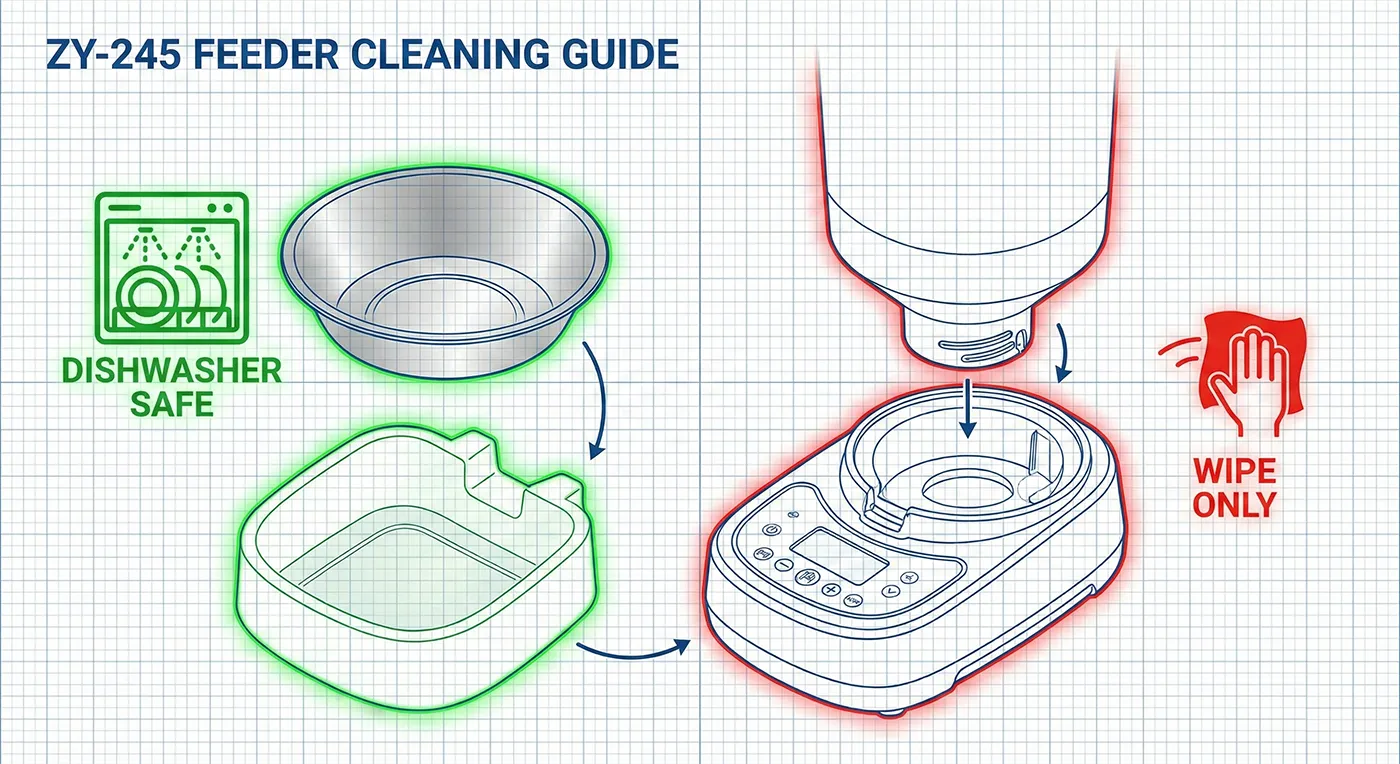
Comprehensive maintenance guide for the SnnyPet ZY-245: Removable feeding components are dishwasher safe for hygiene, while the electronic base must only be wiped with a damp cloth to prevent damage.
How often should I clean the SnnyPet bowl to prevent bacteria buildup?
To prevent biofilm buildup (a slimy layer of bacteria), we recommend washing the stainless steel bowl every 3-4 days. For a complete deep clean, empty the hopper every 2 weeks and wipe the interior with a pet-safe disinfectant to ensure the food remains fresh and uncontaminated.
Why is the motor running but no food is coming out of my ZY-245?
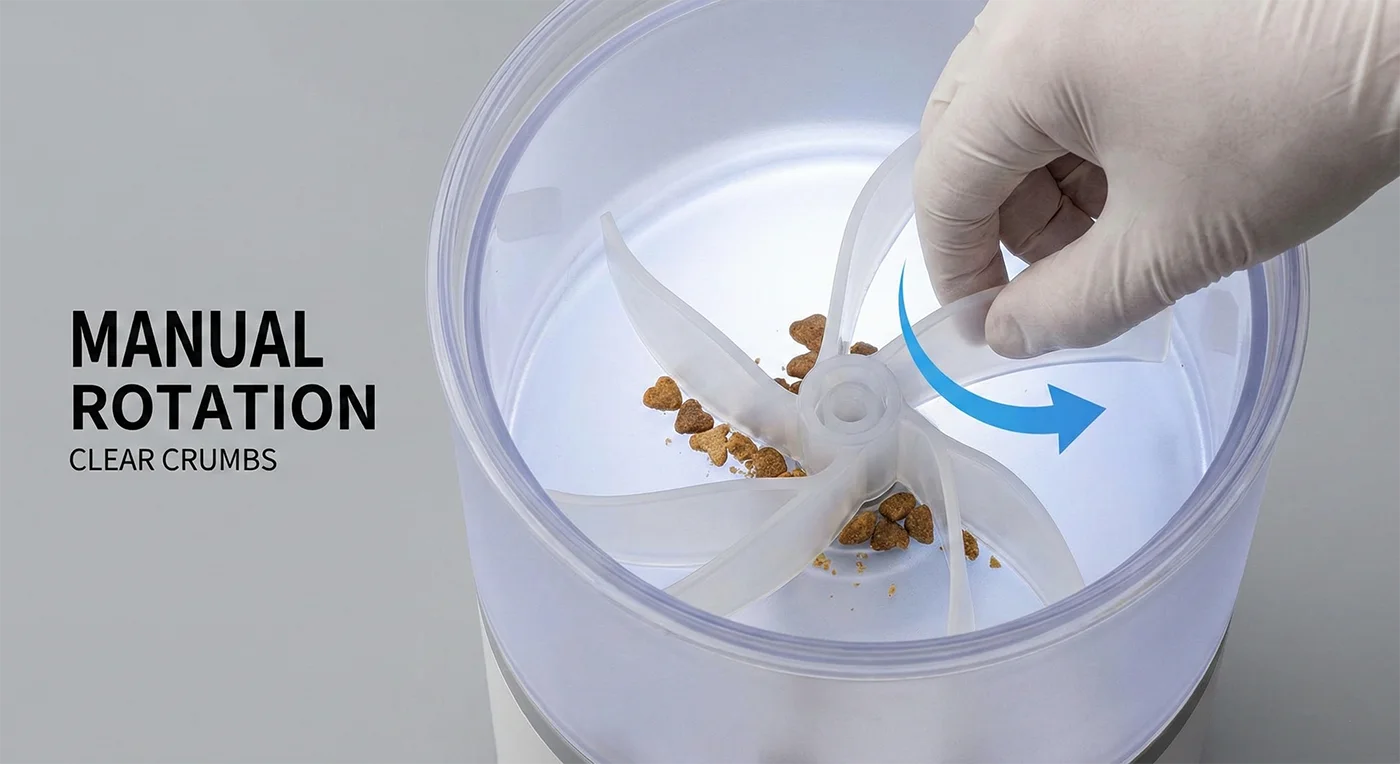
This is usually caused by a rotor blockage. Unplug the device, remove the hopper, and check for kibble pieces or food dust hardened between the rotor blades. Ensure the dispensing mechanism can move freely by rotating it manually with your hand before restarting.
How can I prevent the "rotor blocked" error on my SnnyPet feeder?
Prevention is key: only use dry kibble between 5-15mm in diameter. Avoid moist, irregularly shaped, or sticky semi-moist foods, as these are the primary causes of jams. Also, empty and clean the hopper monthly to prevent old food dust from accumulating.
Why is my SnnyPet ZY-245 constantly disconnecting from Wi-Fi?
The ZY-245 requires a stable 2.4GHz Wi-Fi connection. If your router uses a combined 2.4GHz/5GHz SSID, the device may drop offline. We recommend using a dedicated 2.4GHz channel and ensuring the feeder is placed within 30 feet of the router with minimal obstructions.
What causes the SnnyPet camera feed to buffer or go offline?
Physical obstacles like concrete walls or appliances can degrade the signal. If the indicator light on the device is not solid blue, it means the connection is lost. Try a full power cycle of both your router and the feeder (unplug for 10 seconds).
The laser on my ZY-245 won't turn on—is it broken?
Open the iCam 365 app, enter the live view, and use the PTZ/Directional control to activate the laser. Ensure your app has the latest firmware update, as settings can sometimes be reset.
Why did the laser stop working after a few minutes of play?
For safety, avoid continuous laser use for extended periods. If the laser stops, close the iCam 365 app and wait 5 minutes for the unit to cool down. If it still doesn’t work after a rest, please contact our support team.
Why is the portion size inconsistent on my SnnyPet ZY-245?
Like most smart feeders, the ZY-245 measures by volume (rotor rotations), not by weight. Variations in kibble size, shape, and density can lead to a normal variance of ±2g per serving.
How do I fix the portion weight after switching pet food brands?
Whenever you change kibble, we recommend using a kitchen scale to weigh one dispensed serving. You can then adjust the number of portions in your scheduled feeding plan to ensure your pet gets the exact amount of calories required.
What should I do if the iCam 365 app crashes or freezes?
Force-close and reopen the app, then check the App Store or Google Play for an iCam 365 update. If the issue persists, try clearing the app cache or reinstalling the application.
Is there a known issue with the iCam 365 app on Android 14?
Some Android 14 users may need to manually enable “Background Data Usage” and “Battery Optimization: Unrestricted” for the iCam 365 app to ensure stable real-time notifications and connectivity.
Why am I getting false exit alerts when my dog is inside the house?
This is caused by GPS drift. Indoors, GPS signals can reflect off walls and “jump.” Since the G761 has an outdoor accuracy of 5-10m, we recommend setting your Tlife app fence buffer slightly wider or removing the collar when indoors to prevent “phantom alerts.”
How can I reduce false triggers on my G761 virtual fence?
Ensure the G761 antenna is positioned on the back of the neck, facing upward for optimal satellite reception. Also, simplify your fence shape by avoiding sharp angles; smooth polygons are less prone to calculation errors.
My G761 is flashing lights—why can't it find a signal?
According to the manual, a Green Light single flash means the device is searching for GPS satellites, while a Blue Light single flash means it’s searching for a network signal. Move to an open field away from tall buildings or metal structures to help the device get a “fix” faster.
What if my G761 cannot get a location even after 30 minutes outside?
Perform a hard restart by holding the power button for 10 seconds. Note that a “cold fix” during first-time setup can naturally take 3-5 minutes as the device maps the constellation. If it still fails, the GPS module may need replacement.
Why is the G761 battery draining so quickly?
Battery life depends on your update frequency. In the Tlife app, check if you are in Normal Mode (1-min updates), which consumes the most power. For longer battery life, switch to Power Saving (60-min updates). Actual battery life varies based on your pet’s activity and signal strength.
Why does the G761 drain its battery overnight despite a full charge?
Cold weather (below 32°F/0°C) can reduce lithium battery performance. Also, if the tracker is in a basement or area with weak cellular signal, the device will use more power trying to stay connected. Ensure the device is powered off or in a good signal area when not in use.
Why does the map show my dog in the neighbor's yard?
Standard GPS has an accuracy margin of 5-15 meters. In dense neighborhoods, buildings and trees can reflect signals (multipath error), causing the map pin to shift slightly. This is normal for consumer-grade GPS technology.
How do I get the most accurate real-time location on the map?
If your device is in Power Saving mode, the position shown may be from up to 60 minutes ago. You can refresh the location at any time within the Tlife app. Note that indoors, the G761 will switch to Wi-Fi or LBS positioning, which has a larger error margin than outdoor GPS.
The SnnyPet Q12 is not responding to barking—is it broken?
The most common cause is a loose fit. The Q12’s vibration device must be in close contact with the skin. According to the manual, you should only be able to fit one finger between the strap and the neck. For thick-coated dogs, ensure the device is centered on the throat and the hair is parted to allow the unit to sit snugly.
Why doesn't the SnnyPet Q12 pick up my dog's quiet barks?
Check your sensitivity setting (Levels 1-8). For quiet barks, try Level 5 or higher. Also, note the safety feature: if triggered 6 times consecutively, the Q12 will stop working for 1 minute to protect your pet before resuming automatically.
Why does the SnnyPet Q12 activate randomly while my dog is playing?
If the collar is too loose, the device box may slide and bounce against the dog’s neck, which the internal sensor might misinterpret as a bark. Tightening the collar to the “one-finger” standard will resolve most random triggers.
Why does the SnnyPet Q12 go off when my dog is eating or drinking?
Strong swallowing movements can sometimes be detected by the high-sensitivity sensors. If this occurs, try lowering the sensitivity level in the app or slightly adjusting the position of the device on the neck.
My Q12 is plugged in but there is no light—what should I do?
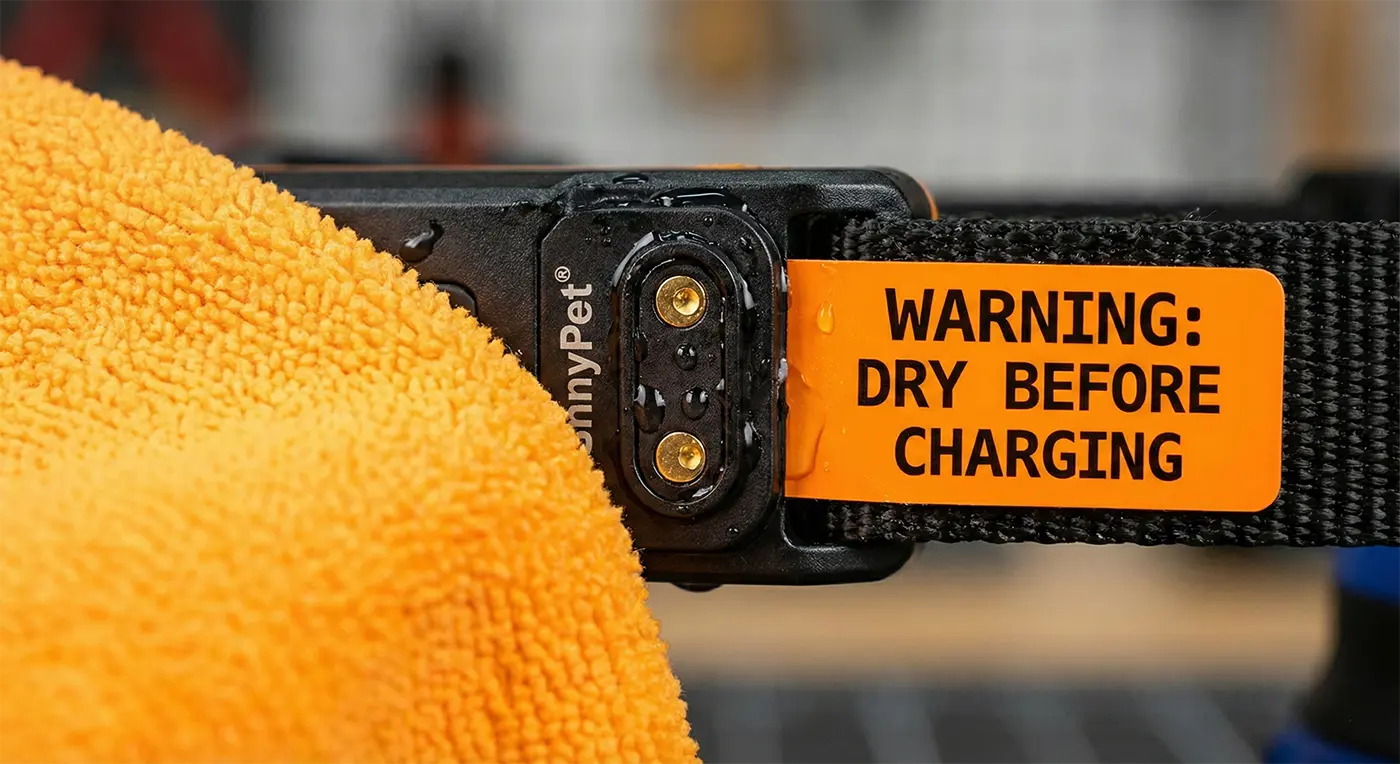
Moisture is enemy #1. Ensure the charging port is completely dry before connecting. Use compressed air or let it air-dry for an hour after water exposure. If it was deeply discharged to 0%, it may take 5-10 minutes before the LED shows it is charging.
My SnnyPet Q12 is not charging properly.
Ensure you are using a 5V output charger only. Chargers with 9V or 12V output will damage the device. Check the USB charging port for any debris and ensure the cable is firmly plugged in. The battery icon will indicate charging status.
The SnnyPet Q12 stopped working after 3 months—can I get a replacement?
SnnyPet offers a 1-year warranty on manufacturing defects. Before filing a claim, try a hard reset by holding the power button for 15 seconds. Note that physical damage from chewing or saltwater corrosion voids the warranty.
Why did my Q12 suddenly stop mid-use?
Check your charger and power source first, as some wall bricks are incompatible. Lithium batteries typically last 300-500 cycles (1-2 years); if your device is over a year old, a battery replacement service is available.
Why did the Q12 leave red marks on my dog's neck?
Irritation is caused by constant physical pressure and moisture, not the vibration itself. Follow the 12-hour max rule—never wear the collar 24/7 and remove it every night to let the skin breathe.
How can I prevent skin irritation under the SnnyPet Q12 receiver?
Rotate the collar’s position every few hours to vary the pressure points. Ensure the neck area is clean and dry. Most importantly, do not wear the device for more than 12 hours per day.
What is the best way to clean my pet's smart electronics?
Never submerge electronics in water. Use a damp microfiber cloth with mild soap for plastic housings, and dry immediately. For sensors and camera lenses, use only a dry microfiber cloth or a specialized lens wipe to avoid scratching.
Can I use Clorox wipes or alcohol on my pet feeder?
You can use 70% isopropyl alcohol on hard, non-porous surfaces like plastic and metal, but avoid rubber seals. If the hopper has mold, wash it with soap and water, then let it air-dry for 24 hours; a cycle with baking soda can help absorb any lingering odors.
My dog chewed the charging cord—does the warranty cover this?
No. Pet damage is considered accidental, not a manufacturing defect, and is not covered by the standard warranty. You can purchase replacement straps, cables, and sleeves in the “Spare Parts” section of our website.
Can I tape up a chewed cord to keep using the feeder?
Unplug it immediately. Do not attempt to repair an electrical cord with tape; it poses a fire and shock hazard. Replace the cord entirely and use a bitter apple spray or cord hider to prevent future chewing.
What is the number one cause of device failure for SnnyPet?
Moisture in the charging port. Whether it’s the G761 tracker or Q12 collar, the port must be completely dry before connecting to power. This simple step prevents short circuits and extends your device’s life by years.
How do I ensure the SnnyPet ZY-245 dispenses the correct amount of food?
The ZY-245 dispenses food based on volume (“portions”). To ensure accuracy, use dry kibble sized between 5-15mm. For a new food brand, we recommend weighing the first few manual portions to determine how many “portions” equal your pet’s required gram weight.
What is the best shape for a G761 geofence?
Smooth polygons. Avoid sharp angles or “star” shapes, as these create calculation errors in the GPS logic. A simple rectangle or smooth multi-sided shape provides the most stable boundary detection.
The device is unresponsive—how do I force a reset?
For the SnnyPet Q12 or G761, long-press the power button to restart. For the SnnyPet ZY-245, open the lid and hold the WiFi Reset button for 4 seconds until the indicator flashes blue to re-enter pairing mode.
Is it okay to let my dog swim in the ocean with the G761?
Yes, but saltwater is highly corrosive. You must rinse the device thoroughly with fresh water immediately after leaving the beach and dry the magnetic contact points to prevent permanent damage to the charging port.
Why is the G761/Q12 charging so slowly?
Some high-wattage wall bricks (2A+) can trip the device’s internal protection circuits. Try charging from a computer USB port or a lower-amperage (500mA-1A) adapter for a more stable and safe charge.